In my time at Microsoft, I worked on the team responsible for the development and standardization of Passkeys. Passkeys have made standard, secure, cryptographic authentication accessible to all users, but the model is tightly restricted to website/app login.
Even with a deep, code-level understanding of passkeys and WebAuthn, it wasn’t until now, six years later, that I realized a set of properties and behaviors present within Passkeys could be hijacked to make this post possible. This ‘feature’ was sitting right there and feels so obvious in retrospect. It just goes to show if you remain curious and turn over every rock, you can bend technology to do new and interesting things.
PassSeeds is a hack that explores this question: can we hijack the capabilities and UX of passkeys for use cases that stretch beyond their rigid login model and limited key-type support? The status quo of many Web-based use cases involving long-held cryptographic keys is often users pasting key material into sites/apps or buying special hardware devices that are difficult for less technical folks to use.
Booting Up On Passkeys
To understand PassSeeds, it helps to have some awareness of the underlying Passkey technology they are based on.

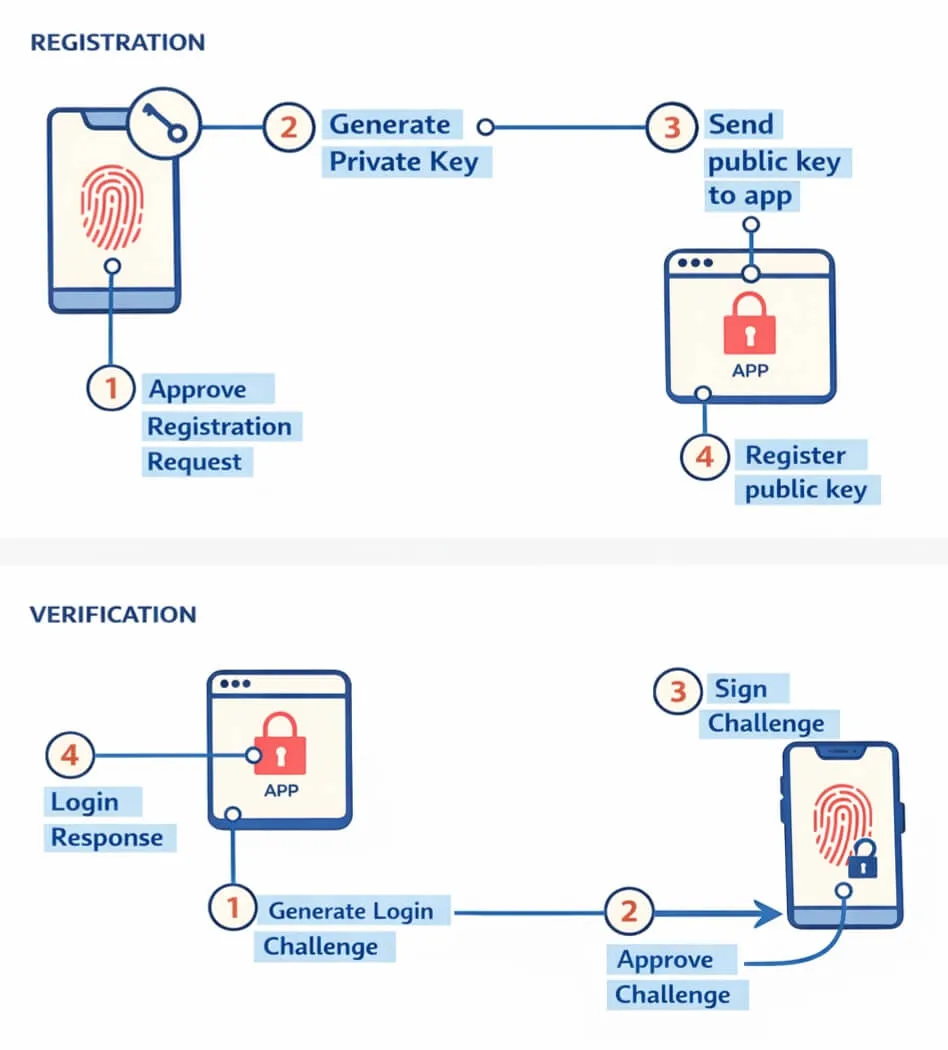
Passkeys are asymmetric key pairs formatted as WebAuthn credentials, typically used to replace passwords for website logins. A key pair is created on the user’s device for a website and stored in a secure hardware module. Access to and usage of these key pairs is scoped to the origin of the site they were created on (for example: example.com, other.example.com, test.com). Passkeys are replicated across a user’s devices by the platform (iCloud Keychain, Google Password Manager, Windows Hello, etc.) via an end-to-end encrypted sync process. Below is a basic overview of the two primary UX flows for generating a passkey and using one for login:
Key Points (pun intended)
There are several attributes of Passkeys to keep in mind that are critical to the PassSeed mechanism detailed in this post:
- Passkeys are key pair + metadata bundles that are securely stored and synced across a user’s devices by OS/platform
- The private and public key are both stored and synced across devices as one highly sensitive bundle
- If you never store it at generation time and do not allow signatures from its private key out of the generating origin’s boundary, no API, metadata, or side-channel reveals the public key.
Given these attributes of the Passkey model, even public keys in the system behave like a natively provisioned, hardware-secured, synced secret, even though cryptography does not require them to be secret. This is a rare and valuable set of properties many products, services, and protocols find highly desirable.
Introducing PassSeeds
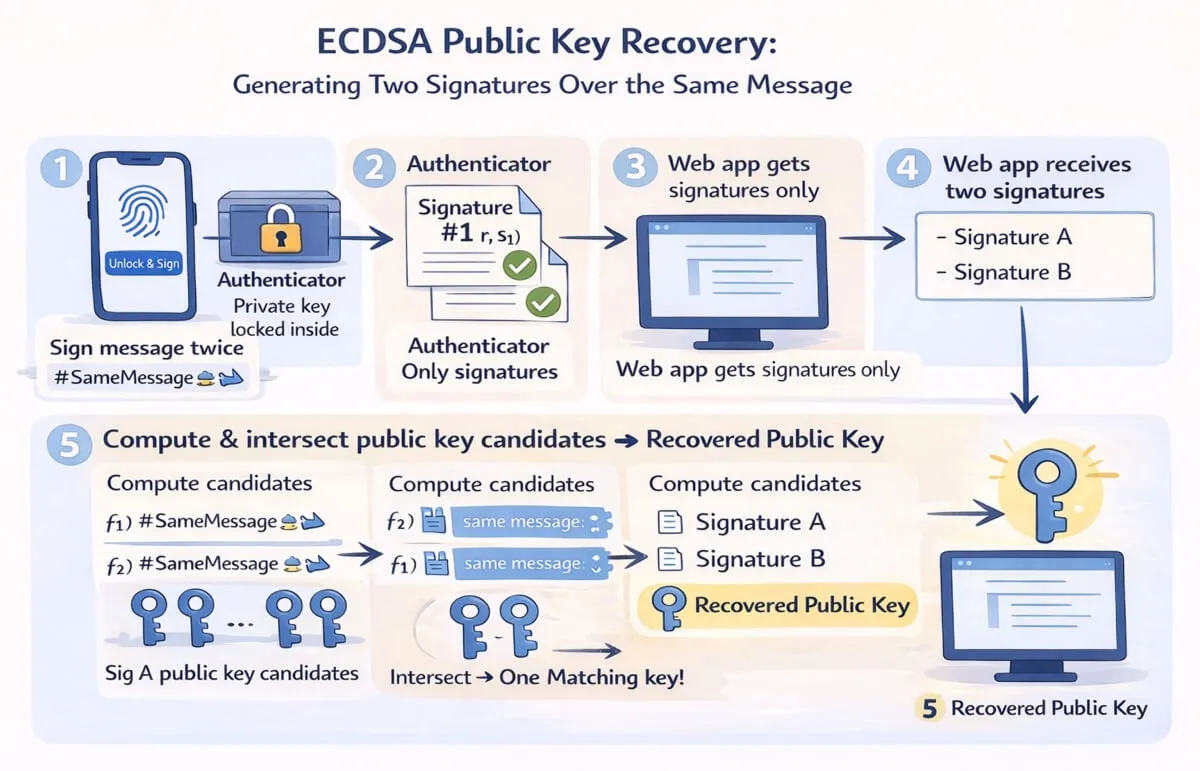
Passkeys provide biometrically gated use of cryptographic keys, but they were created specifically for authentication signing in centralized website login flows. Meanwhile, web apps that need cryptographic material and curves that passkeys don’t support (secp256k1 for Bitcoin, BLS12-381 for ZKPs, etc.) remain primitive and convoluted. Users copy 12–24 words, stash JSON keystores, or paste raw keys across apps. PassSeeds introduces a novel approach: treat the passkey’s P‑256 public key itself as seed material and retrieve it on demand through ECDSA public‑key recovery. The authenticator still keeps the private key and user‑verification requirements, but the recovered public‑key bytes become the deterministic PassSeed that can serve as the foundation for other cryptographic use cases.
(If you don’t want to understand how it works, you can skip to the DEMO)
PassSeed Generation
Assumptions: you have created a passkey, did not export the public key anywhere at generation time, and do not allow any signatures from the passkey outside of the generating origin’s local boundary.
Initial Generation
- Call
navigator.credentials.create()withuserVerification: requiredto mint a P-256 passkey scoped to the generating origin’s RP ID. - The initial passkey creation operation is the only API call where the platform returns the public key, but DO NOT export the public key, as it is effectively the private seed value of the PassSeed and can be recovered later through cryptographic means.
- Use the returned public key to generate the cryptographic seed bytes.
Regeneration via ECDSA Key Recovery
- When a PassSeed is needed (for example, to sign a Bitcoin transaction, sign a decentralized social media post, or generate/verify a zero-knowledge proof), craft a message (for example,
PassSeed ${nonce}) for signing with the passkey. - Ask the user to sign the message twice via
navigator.credentials.get()using the same message and RP scope each time. - Each assertion returns a P-256 ECDSA signature. Because both signatures are over the same message, client code can perform ECDSA public key recovery using the two signatures to derive the unique P-256 public key of the passkey. No private material leaves the authenticator, and the app receives only the public key bytes.
- The recovered public key (in compressed or uncompressed form) is the PassSeed. It is reproducible on-demand by repeating the double-sign ECDSA recovery flow, with no exportation of the PassSeed public key at any time.
Recovery / Rotation
If a device is lost, but other devices with the passkey that backs the PassSeed are still available, any new device added to the accout of the user will have their PassSeed automatically synced upon device enrollment, which is a process handled by the native platform. If all devices with the backing passkey are lost, you can still access and control whatever was tied to your PassSeed via the exported mnemonic phrase, if you elected to do that (which is strongly recommeded). Because PassSeeds and their backing Passkeys cannot be imported into the Passkey mechanism, if you lose all devices with the backing Passkey, you will need to transfer anything tied to the old PassSeed to a new one on your active devices (again, assuming you backed up your PassSeed via exporting its mnemonic phrase).
Converting a PassSeed to a Mnemonic Phrase
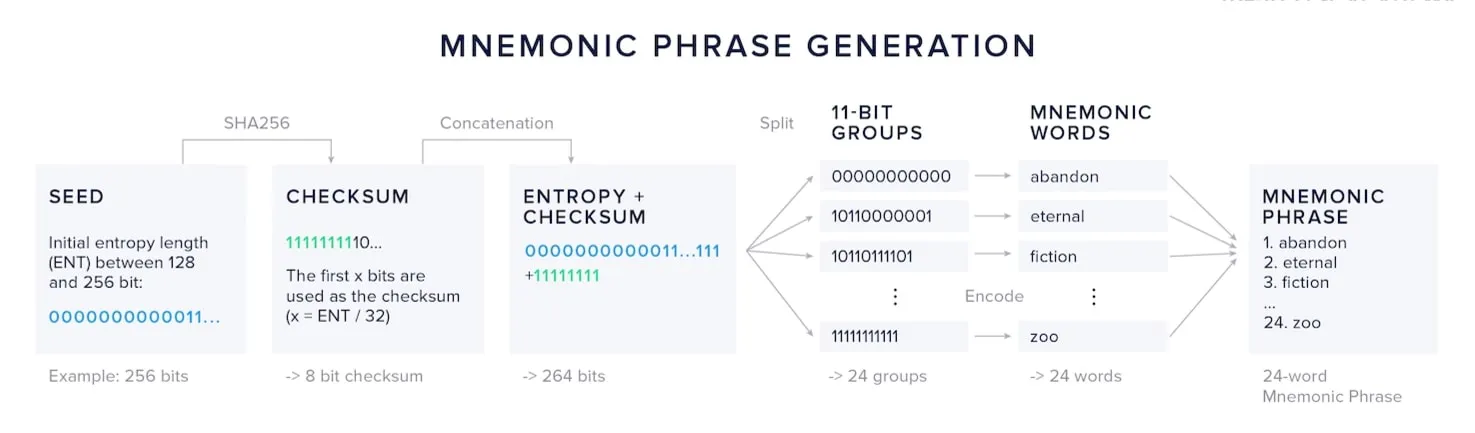
To make the PassSeed user-friendly, the implementation converts the 32-byte PassSeed into a standard BIP-39 mnemonic. In practice, the PassSeed is the SHA-256 hash of the recovered public key, represented as 32 bytes. Users can write down the phrase to ensure that even if something happens to their PassSeed (e.g. they accidentially delete it), they can retain access to the keys it is capable of producing. Rerunning the ECDSA recovery process with the same passkey deterministically yields the same phrase.
Deriving Other Keys from the PassSeed
Once you have the PassSeed (public key bytes or its mnemonic-derived entropy), you can deterministically derive other cryptographic material:
- Bitcoin signing: use an HKDF with a domain-separated label to produce 32 bytes, clamped to the secp256k1 field, and treat it as a private key for transaction signing.
- App/protocol-specific keys: derive additional context-labeled keys for different apps and protocols that use keys as identifiers (decentarlized social media), all from the same seed material.
- ZKP credentials: derive scalar material for
BLS12-381or other proving curves, enabling deterministic prover keys or presentation keys for zero-knowledge credentials.
Implementation
The following are the code snippets for the core methods from the PassSeed TypeScript implementation, avaiable in the PassSeed Github repo. Some of the methods reference helpers that are contained in the module, but are not shown here, for brevity.
PassSeed.create()
This method orchestrates the complete WebAuthn credential creation flow, extracts the credential’s P-256 public key from the CBOR attestation object, and returns a hex-encoded SHA-256 hash of the public key bytes.
static async create(
  options: { user?: string; seedName?: string } = {}
): Promise<string> {
  const now = new Date();
  const {
    user = "anon",
    seedName = `PassSeed Seed - ${now.getMonth() + 1}/${now.getDate()}/${now.getFullYear()}`
  } = options;
  // Step 1: Initiate WebAuthn credential creation
  const credential = await navigator.credentials.create({
    publicKey: {
      challenge: crypto.getRandomValues(new Uint8Array(32)),
      rp: { name: "PassSeed" },
      user: {
        id: crypto.getRandomValues(new Uint8Array(16)),
        name: seedName,
        displayName: user
      },
      pubKeyCredParams: [{ type: "public-key", alg: -7 }],
      authenticatorSelection: {
        authenticatorAttachment: "platform",
        userVerification: "preferred"
      },
      timeout: 60000,
      attestation: "direct"
    }
  }) as PublicKeyCredential;

  if (!credential) {
    throw new Error("Credential creation cancelled");
  }

  // Step 2: Extract the public key from the attestation object
  const attestationObject = (credential.response as AuthenticatorAttestationResponse).attestationObject;
  const publicKey = extractPublicKeyFromAttestation(attestationObject);
  const publicKeyBytes = concatBytes(new Uint8Array([0x04]), publicKey.x, publicKey.y);

  return seedStringFromPublicKeyBytes(publicKeyBytes);
}
PassSeed.get()
This method retrieves an existing passkey (optionally by credential ID), performs two WebAuthn signatures over the same challenge, reconstructs the public key via ECDSA recovery by intersecting candidate points from both signatures, and returns the hex-encoded PassSeed string.
static async get(options: PassSeedGetOptions = {}): Promise<string> {
  if (options != null && typeof options !== "object") {
    throw new Error("PassSeed.get expects an options object when parameters are provided");
  }
  const { credentialId, onBeforeSecondSignature } = options ?? {};
  // Step 1: Prepare a single challenge that both assertions will sign
  const challenge = crypto.getRandomValues(new Uint8Array(32));

  const assertionOptions: CredentialRequestOptions = {
    publicKey: {
      challenge: challenge,
      timeout: 60000,
      userVerification: "preferred"
    }
  };

  // If credentialId is provided, target that specific credential
  if (credentialId) {
    assertionOptions.publicKey!.allowCredentials = [{
      type: "public-key",
      id: toArrayBuffer(base64urlnopad.decode(credentialId))
    }];
  }

  // Step 2: First signature - collect authenticator response
  const assertion1 = await navigator.credentials.get(assertionOptions) as PublicKeyCredential;

  if (!assertion1) {
    throw new Error("User cancelled authentication");
  }

  const response1 = assertion1.response as AuthenticatorAssertionResponse;
  const signature1 = response1.signature;
  const authenticatorData1 = response1.authenticatorData;
  const clientData1 = response1.clientDataJSON;

  // Capture the credential ID from the first assertion if not already provided
  const usedCredentialId = credentialId
    ? toArrayBuffer(base64urlnopad.decode(credentialId))
    : assertion1.rawId;

  if (onBeforeSecondSignature) {
    await onBeforeSecondSignature();
  }

  // Step 3: Second signature over the same challenge
  assertionOptions.publicKey!.challenge = challenge;
  assertionOptions.publicKey!.allowCredentials = [{
    type: "public-key",
    id: usedCredentialId
  }];

  const assertion2 = await navigator.credentials.get(assertionOptions) as PublicKeyCredential;

  if (!assertion2) {
    throw new Error("User cancelled second authentication");
  }

  const response2 = assertion2.response as AuthenticatorAssertionResponse;
  const signature2 = response2.signature;
  const authenticatorData2 = response2.authenticatorData;
  const clientData2 = response2.clientDataJSON;

  // Step 4: Recover the public key from both signatures and intersect candidates
  const clientHash1 = sha256(new Uint8Array(clientData1));
  const signedData1 = concatBytes(new Uint8Array(authenticatorData1), clientHash1);
  const messageHash1 = sha256(signedData1);

  const clientHash2 = sha256(new Uint8Array(clientData2));
  const signedData2 = concatBytes(new Uint8Array(authenticatorData2), clientHash2);
  const messageHash2 = sha256(signedData2);

  const { r: r1, s: s1 } = decodeDerSignature(signature1);
  const { r: r2, s: s2 } = decodeDerSignature(signature2);

  const candidates1 = recoverPublicKeys(r1, s1, messageHash1);
  const candidates2 = recoverPublicKeys(r2, s2, messageHash2);

  const candidateMap = new Map<string, NoblePoint>();
  for (const candidate of candidates1) {
    candidateMap.set(pointToKey(candidate), candidate);
  }

  const intersection: NoblePoint[] = [];
  for (const candidate of candidates2) {
    const key = pointToKey(candidate);
    if (candidateMap.has(key)) {
      intersection.push(candidate);
    }
  }

  if (intersection.length !== 1) {
    throw new Error("Unable to recover a unique public key from signatures");
  }

  const publicKeyBytes = intersection[0].toBytes(false);
  return seedStringFromPublicKeyBytes(publicKeyBytes);
}
PassSeed.toMnemonic()
This method converts a 32-byte PassSeed (as bytes or hex) into a human-readable BIP-39 mnemonic phrase for backup and recovery, optionally truncating to 16 bytes for a 12-word phrase before handing entropy to bip39.entropyToMnemonic with the English wordlist.
static async toMnemonic(passSeed: Uint8Array | string, wordCount: 12 | 24 = 24): Promise<string> {
  const passSeedBytes = typeof passSeed === "string" ? PassSeed.hexToBytes(passSeed) : passSeed;
  if (passSeedBytes.length !== 32) {
    throw new Error("PassSeed must be exactly 32 bytes");
  }
  if (wordCount !== 12 && wordCount !== 24) {
    throw new Error("Mnemonic word count must be 12 or 24");
  }

  const entropyBytes = wordCount === 12 ? passSeedBytes.slice(0, 16) : passSeedBytes;
  const entropyHex = bytesToHex(entropyBytes);
  return bip39.entropyToMnemonic(entropyHex, bip39.wordlists.english);
}
Threat Model and Constraints
The authenticator still enforces RP binding and user verification before issuing signatures, so phishing resistance mirrors standard passkeys. The host page sees two signatures and the recovered public key, values one must assume the host can exfiltrate. Because the same message is signed twice, replay risk is mitigated by including nonces, RP ID, and a strict prefix so signatures cannot be repurposed. Syncable passkeys inherit the platform’s end-to-end encrypted sync features.
Why not use the WebAuthn’s PRF or Large Blob features?
The WebAuthn specification has defined a PRF extension for deterministically generating per-credential secrets, and a Large Blob extension, which can be used to encrypt and save a randomly generated secret that is synced across the user’s devices, both of which could achieve the desired ends. The problem is API support: PRF and Large Blob features are not implemented across browsers today, and there is no signal that either will be in the near future. That makes it hard to rely on in production if you need your app to work everywhere.
PassSeeds can even be used to create a polyfill for the PRF feature: by deterministically recovering a stable cryptographic value from the passkey signature flow (the public key), you can use that value to generate deterministic, cryptographic values based on input values, which will regenerate the same value for the same input, every time. If the tradeoffs of PassSeeds are acceptable, you can integrate PRF-reliant use cases in apps today, across all browsers. I plan on writing a PRF polyfill soon, so stay tuned.
Demo & NPM Package
The following is a demo page that allows you to create PassSeeds, reload the page to test regeneration (via the ECDSA recovery process), and view the Mnemonic phrase of PassSeeds you’ve created: PassSeeds Demo
You can also include PassSeeds in your Web apps via NPM: PassSeeds NPM Package